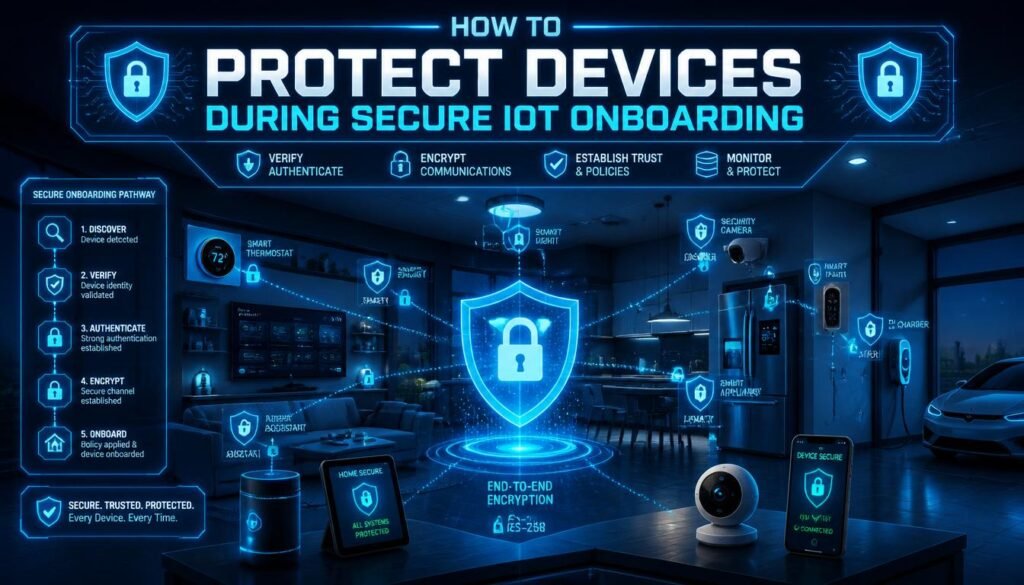
I recently bought a smart coffee maker because I wanted to wake up to the smell of fresh coffee. I thought I was living in the future. That was until my coffee maker started brewing hot water at three in the morning and flashing its lights like a tiny disco. It turns out my appliance had made a friend on the internet, and that friend was a hacker. My coffee pot had joined a global robot army. That is when I realized that smart devices are basically gullible toddlers. If you do not hold their hands and protect them, they will wander off with strangers. Today, I am going to teach you how to properly introduce your new smart gadgets to your home network without inviting a disaster.
What Exactly is IoT Onboarding?
Before we talk about protection, we need to understand the words. IoT stands for the Internet of Things. It is a very fancy term for everyday objects that connect to the internet. A normal lightbulb is just a lightbulb. A smart lightbulb that you can turn on with your mobile phone is an IoT device. This includes smart refrigerators, smart doorbells, smart locks, and even smart pet feeders.
Onboarding is the process of connecting these brand new devices to your internet network for the very first time. Think of onboarding like the first day of school for your device. It is the moment your smart plug meets your router. They shake hands. They share some secret codes. The router gives the device a set of rules. This very first meeting is the most dangerous time for your device. If you do not handle this meeting correctly, you leave the front door of your digital house wide open for anyone to walk inside.
Why Hackers Target Small Smart Devices:
You might be thinking about why a hacker would care about your smart lightbulb. They do not care what color your living room is. They care about the door that the lightbulb opens. Your home internet network is like a big house. Your computer and your mobile phone are inside the house. They have important things like your bank passwords and your personal emails.
Your computer is usually very safe. It has big antivirus programs and strong firewalls. It is like a heavy steel door with five locks. But your smart lightbulb is very cheap. It has a tiny brain. It cannot run a heavy security program. It is like a flimsy screen door held shut by a single piece of tape.
Hackers break into the smart lightbulb because it is incredibly easy. Once they are inside the lightbulb, they are inside your house network. From there, they can walk down the digital hallway and try to break into your computer from the inside. Hackers also love smart devices because they can group them together. They can hack ten thousand smart cameras and force them all to attack a big website at the exact same time. This is called a botnet, and it is a massive problem. Your secure onboarding process stops all of this from happening.
Buying Safe Devices Before You Start:
Security actually begins before you even open the box. You cannot do a secure onboarding process if you buy a terrible device. The internet is full of extremely cheap smart gadgets made by companies no one has ever heard of. These cheap devices are dangerous. The companies make them quickly to save money. They completely ignore security rules.
When you buy an IoT device, you need to look for good brands. A big technology company cares about its reputation. If their smart lock gets hacked, they lose millions of dollars. Because of this, they spend a lot of money making sure their devices are safe.
You should also read the reviews before you buy anything. Look for reviews that mention the software. Does the company update the mobile application often? If the mobile app has not been updated in four years, do not buy the device. Old software is full of holes that hackers know how to use. Spending ten extra dollars on a famous brand is the smartest security decision you can make.
The Ultimate Secret Weapon is the Guest Network:
This is the most important piece of advice in this entire article. You must never connect your smart devices to your main internet network. Most modern internet routers allow you to create something called a guest network.
Imagine your router is a large hotel. Your main network is the VIP section of the hotel. This is where your personal computer, your work laptop, and your mobile phones live. This section holds all your private information.
The guest network is the public lobby of the hotel. People can use the internet in the lobby, but they are not allowed to go up the stairs into the VIP rooms. You need to put all your IoT devices in the guest network. You must put your smart television, your smart speakers, and your smart plugs in this lobby area.
If a hacker breaks into your smart coffee maker on the guest network, they are stuck in the lobby. They cannot cross over into your main network to steal your banking details. Creating a guest network is very easy. You just open your internet router settings on your computer. You click a button that says enable guest network. You give it a new name and a strong password. This one simple step solves almost every single smart home security problem.
A Step-by-Step Secure Onboarding Guide:
Now that we understand the risks and we have our guest network ready, it is time to turn on the device. Do not just plug it in and click next on the screen a dozen times. You must follow these specific steps very carefully.
Step One is Inspecting the Physical Device:
When you take the device out of the box, look at it closely. Does it look damaged? Is the seal on the box broken? Sometimes, bad people buy devices, put secret hacking chips inside them, and return them to the store. The store sells the broken device to you. If anything looks strange or is glued together poorly, return the device immediately.
Step Two is Getting the Official Application:
Almost every smart device requires a mobile application to finish the onboarding process. You must be extremely careful here. Hackers put fake applications in the app stores. If you download a fake app, you give the hacker full control right away.
Do not just search the name of the device in the app store. Look at the paper manual that came inside the box. The manual will have a little square barcode called a QR code. Use your phone camera to scan that exact code. It will take you to the correct, official application.
Step Three is Creating a Safe Account:
When you open the new application, it will ask you to create an account. Do not use the same password you use for your email or your bank. You must create a completely new, very long password.
I like to use a simple trick to make passwords. I pick four random words that have nothing to do with each other. For example, you could use the words purple, elephant, jumping, and quickly. You push them all together. You add a number and a symbol. This creates a password that is very easy for a human to remember but totally impossible for a computer program to guess.
Step Four is Changing the Default Credentials:
Many devices come from the factory with a default username and password already built inside them. Usually, the username is admin, and the password is password. Hackers know all of these default passwords. They have giant lists of them.
The very first time you connect the device to your phone, you must dive into the settings menu. You must look for a section called device security or network settings. If there is a default password, you must delete it and type in a new one. If you skip this step, your device will be hacked within five minutes of joining the internet.
Step Five is Updating the Brain:
Your smart device runs on a special type of software called firmware. Firmware is the brain of the machine. The device was probably built in a factory six months ago. It sat on a ship, then it sat in a warehouse, and then it sat on a store shelf. During those six months, hackers invented hundreds of new ways to break into things.
The company that made the device probably released an update to fix those new problems. But the device inside your box does not have that update yet. As soon as you connect the device to the internet, you must go into the application settings. Look for a button that says check for firmware updates. Click that button. The device will download the new security fixes and restart. Always do this before you start using the device for its normal job.
Advanced Protection Concepts Explained Simply:
If you want to be a true expert at IoT onboarding, you need to understand a few advanced ideas. Do not worry, I will explain them in very easy English.
The Magic of Encryption:
Encryption is a way of hiding information so nobody else can read it. Imagine you want to send a secret letter to your friend across the classroom. If you write it in plain English, the teacher can read it if she catches it. But if you invent a secret code where the letter A means the letter G, the teacher will just see nonsense.
Your smart devices must use encryption to talk to your internet router. If they do not, a hacker sitting outside your house can pull the data right out of the air. When you set up your internet router, you must make sure it uses a security standard called WPA3 or WPA2. This is the secret code that scrambles the data. Your devices will ask for the Wi-Fi password. Entering that password allows them to learn the secret code and speak safely.
Two Factor Authentication:
This sounds very complicated, but you probably already use it. Two-factor authentication means proving who you are in two different ways. The first way is something you know, like your password. The second way is something you have, like your mobile phone.
When you log into the smart home application, it will ask for your password. Then, it will send a special six-digit number to your mobile phone via text message. You must type that number into the app to get inside. You should turn this feature on for every single smart home application you use. If a hacker steals your password, they still cannot get in because they do not have your physical mobile phone.
MAC Address Filtering:
Every internet device in the world has a completely unique physical serial number burned into its computer chips. This is called a MAC address. No two devices have the same number.
Your internet router can use these numbers to create a VIP guest list. You can tell your router to only allow specific MAC addresses to join the network. When your new smart plug tries to join, you type its unique number into the router settings. The router opens the door. If a hacker tries to join your network with a strange computer, the router looks at their MAC address. Since their number is not on the VIP list, the router slams the door shut. This is an incredibly powerful way to lock down your home.
Understanding What Data Your Devices Collect:
Another huge part of secure onboarding is managing your personal privacy. Security is about keeping hackers out. Privacy is about keeping your personal information safe from the companies that make the devices.
When you onboard a device, the application will ask for permissions. It is very important to read these requests carefully. Your smart television application will ask for permission to use your home network. That makes sense. But why would a smart lightbulb application need permission to look at your mobile phone contacts? Why would a smart vacuum cleaner need permission to use your phone microphone?
Many cheap companies make money by collecting your personal data and selling it to advertising companies. During the onboarding process, you must deny any permission that does not make sense. If the application refuses to work unless you give it your contact list, you should pack the device back in the box and return it to the store. Your privacy is much more important than a lightbulb that changes colors.
Comparing Safe and Unsafe Behaviors:
To make everything completely clear, I have built a simple table. This table shows the difference between a person who does a terrible job at onboarding and a person who does an expert job.
| Action | The Unsafe Way | The Secure Expert Way |
| Picking a Network | Connecting to the main computer network | Creating an isolated guest network just for devices |
| Handling Passwords | Keeping the default factory password | Creating a long and unique passphrase |
| Software Updates | Ignoring the boring update screens | Updating the firmware on the very first day |
| App Permissions | Clicking yes to every single pop-up box | Only allowing permissions the device truly needs |
| Account Security | Using just a simple password | Turning on Two Factor Authentication text messages |
How to Monitor Devices After Onboarding:
The onboarding process is just the beginning. You cannot simply set up your smart devices and then completely forget about them for five years. You must monitor them to make sure they are behaving properly.
Every month, you should open the applications for your devices. Check if there are any new firmware updates. Good companies release updates every few months to fight new hacker tricks.
You should also look at the physical devices. Are they doing strange things? If your smart camera turns on its recording light when nobody is in the room, that is a huge warning sign. If your internet becomes incredibly slow for no reason, your smart devices might be infected and sending data to bad people.
If you ever think a device is acting weird, you must unplug it from the wall immediately. Do not try to fix it while it is turned on. Take away its power. Then, look up the instructions on how to do a complete factory reset. A factory reset wipes the device’s memory completely clean. It deletes everything, including the hacker. After the reset, you have to do the entire secure onboarding process all over again.
The Future of Smart Home Security:
The good news is that the technology industry knows this is a big problem. They are working hard to make secure onboarding much easier for normal people.
There is a new smart home standard called Matter. You will start seeing the Matter logo on the outside of smart device boxes. Matter is a set of strict rules that companies must follow to make their devices talk to each other safely. Devices that use Matter are forced to use strong encryption. They are forced to be secure from the very first second you turn them on.
In the future, onboarding will be completely automatic but entirely safe. Your phone will use special secure Bluetooth signals to verify the identity of the new device before it ever touches your Wi-Fi. But until that future arrives perfectly, you must be the security guard of your own home.
Taking Control of Your Digital House:
Protecting your internet network is exactly like protecting your physical house. You would never leave your front door wide open while you go on vacation. You would never give a copy of your house key to a stranger on the street.
Every time you buy a new smart device, you are adding a new digital door to your house. You must put strong locks on those doors. Setting up a guest network takes five minutes. Creating a strong password takes one minute. Updating the firmware takes three minutes. For less than ten minutes of easy work, you can keep your personal data completely safe.
Stop treating smart devices like harmless toys. They are tiny computers with a connection to the entire world. Treat them with respect. Be intentional about your security. When you follow these clear steps for secure IoT onboarding, you can enjoy all the amazing magic of a smart home without any of the terrible stress.
FAQs:
1. What is the best network to use for smart devices?
You must always use a separate guest network to keep devices away from your main computer.
2. How often should I check my devices for updates?
You should open your smart home applications at least once a month to look for new firmware updates.
3. Why is the default factory password dangerous?
Hackers have giant lists of all factory passwords and will test them to break into your device instantly.
4. Can a hacked smart plug affect my personal laptop?
Yes, if they share the same network, a hacker can use the plug to sneak into your laptop.
5. What does Two Factor Authentication actually do?
It sends a special code to your phone so a hacker cannot log in, even if they steal your password.
6. What should I do if my smart device starts acting strangely?
Unplug it from the wall power immediately and perform a full factory reset to wipe its memory clean.
